JSplitPane – Java Swing – Example
In this tutorial, we are going to see an example of JSplitPane in Java Swing. JSplitPane is used to split two components. The two components are split based on the Look & Feel implementation, and they can be resized by the user. If the minimum size of the two components is larger than the size of the split panel, the splitter will not allow you to resize it.
The two components of a split panel can be aligned left to right using JSplitPane.HORIZONTAL_SPLIT, or top to bottom using JSplitPane.VERTICAL_SPLIT. When the user resizes the components, the minimum size of the components is used to determine the maximum/minimum position on which the components can be defined.
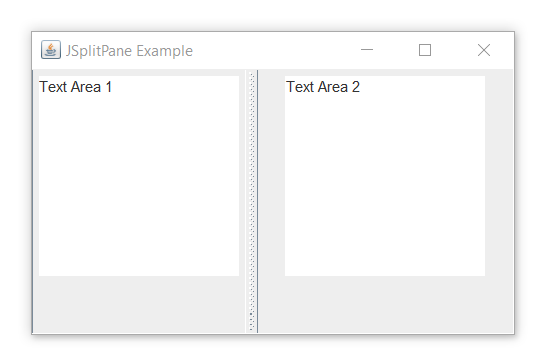
Example of JSplitPane in Java Swing
import javax.swing.event.*;
import java.awt.*;
import javax.swing.*;

class Main extends JFrame
{
    public static void main(String[] args)
    {
        // create a new frame
        JFrame frame = new JFrame("JSplitPane Example");

        // create a panel
        JPanel p1 = new JPanel();
        JPanel p2 = new JPanel();

        // create text boxes
        JTextArea t1 = new JTextArea(10, 16);
        JTextArea t2 = new JTextArea(10, 16);

        // define texts
        t1.setText("Text Area 1");
        t2.setText("Text Area 2");

        // add text boxes to panel
        p1.add(t1);
        p2.add(t2);

        // create a panel separator
        JSplitPane sep = new JSplitPane(SwingConstants.VERTICAL, p1, p2);

        // set the orientation of the separator
        sep.setOrientation(SwingConstants.VERTICAL);

        // add the separator
        frame.add(sep);

        // set the frame size
        frame.setSize(400, 250);
        frame.show();
    }
}
Output: