JTextField – Java Swing – Example
In this tutorial, we are going to see an example of JTextField in Java Swing. JTextField is part of the javax.swing package. JTextField class is a component that allows modifying a single line of text. JTextField inherits from JTextComponent class and uses the SwingConstants interface.
JTextField constructors class:
| JTextField() | Constructor that creates a new TextField |
| JTextField(int columns) | Constructor that creates a new empty TextField with a specified number of columns. |
| JTextField(String text) | Constructor that creates a new empty text field initialized with the given string. |
| JTextField(String text, int columns) | Constructor that creates a new empty text field with the given string and a specified number of columns. |
| JTextField(Document doc, String text, int columns) | Constructor that creates a text field that uses the given storage model and the given number of columns. |
Commonly used methods of JTextField class:
- setColumns(int n) : set the number of columns of JTextField.
- setFont(Font f) : set the font of the text displayed in JTextField.
- addActionListener(ActionListener l) : set an ActionListener on JTextField.
- int getColumns() : gets the number of columns in JTextField.
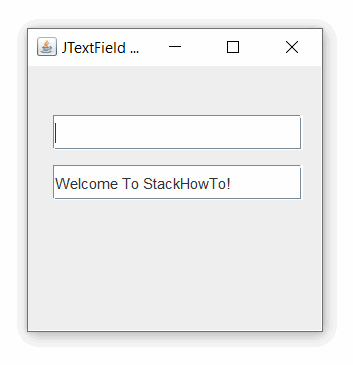
Example 1 of JTextField in Java Swing:
import javax.swing.*;

class Main
{
  public static void main(String args[])
  {
    JFrame frame = new JFrame("JTextField Example");

    JTextField text1 = new JTextField();
    text1.setBounds(20,40,200,28);

    JTextField text2 = new JTextField("Welcome To StackHowTo!");
    text2.setBounds(20,80,200,28);

    frame.add(text1);
    frame.add(text2);
    frame.setSize(250,250);
    frame.setLayout(null);
    frame.setVisible(true);
  }
}
Output:
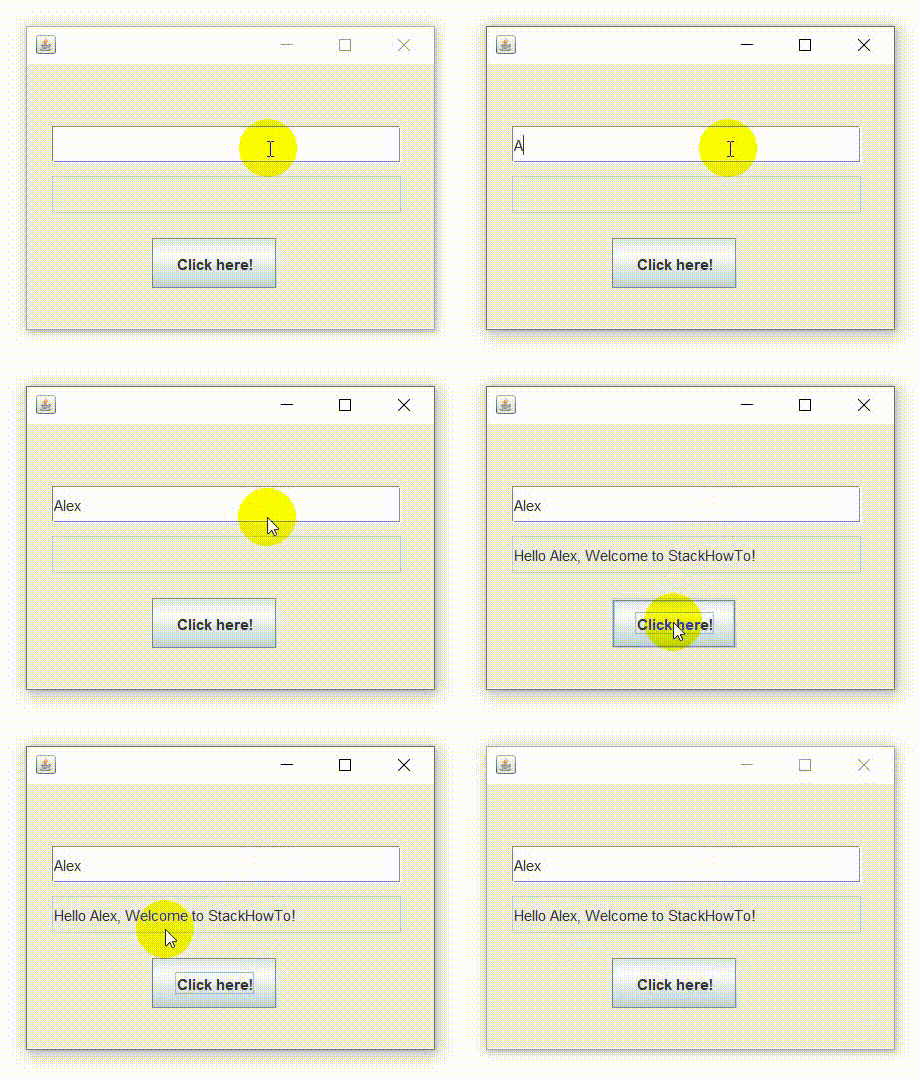
Example 2 of JTextField in Java Swing with ActionListener:
import javax.swing.*;
import java.awt.event.*;

public class TextFieldTest implements ActionListener
{
  JTextField text1,text2;
  JButton btn;

  TextFieldTest()
  {
    JFrame f = new JFrame();
    text1 = new JTextField();
    text1.setBounds(20,50,280,30);
    text2 = new JTextField();
    text2.setBounds(20,90,280,30);
    text2.setEditable(false);
    btn = new JButton("Click here!");
    btn.setBounds(100,140,100,40);
    btn.addActionListener(this);
    f.add(text1);
    f.add(text2);
    f.add(btn);
    f.setSize(340,250);
    f.setLayout(null);
    f.setVisible(true);
  }
  public void actionPerformed(ActionEvent e)
  {
    String name = text1.getText();
    String result = "";
    if(e.getSource() == btn){
      result = "Hello "+name+", Welcome to StackHowTo!";
    }
    text2.setText(result);
  }
  public static void main(String[] args) {
    new TextFieldTest();
  }
}
Output:
🚀 Boost your productivity — Try the best web tools now!