How to Capitalize First Letters in a JTextField in Java
In this tutorial, we are going to see how to capitalize first letters in a JTextField in Java. To capitalize the first letters in a JTextField, you can easily do it by adding a DocumentFilter to JTextField component using setDocumentFilter() method. DocumentFilter allows us to filter the action for document changes such as insert, edit and delete.
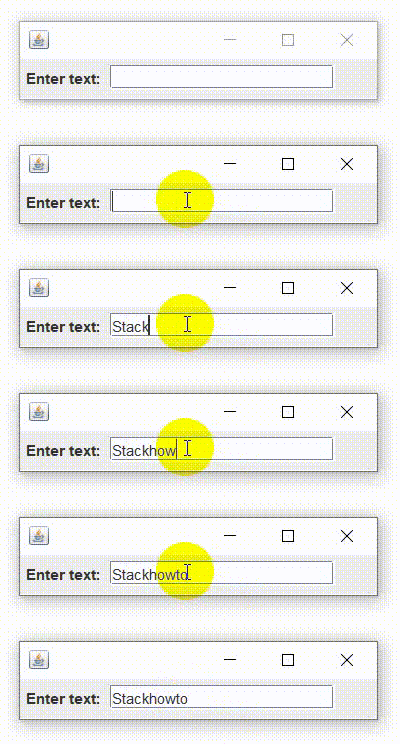
To convert the first letter of a JTextField to uppercase, we use toUpperCase() method.
Java Program to Capitalize the First Letters in a JTextField:
import javax.swing.*;
import javax.swing.text.*;
import java.awt.*;

public class CapTextField extends JFrame
{
    public CapTextField()
    {
        getContentPane().setLayout(new FlowLayout(FlowLayout.LEFT));

        JTextField texte = new JTextField();
        texte.setPreferredSize(new Dimension(180, 20));

        DocumentFilter f = new UppercaseJTextField();
        AbstractDocument doc = (AbstractDocument) texte.getDocument();
        doc.setDocumentFilter(f);

        getContentPane().add(new JLabel("Enter text: "));
        getContentPane().add(texte);
        setSize(300, 70);
        setDefaultCloseOperation(WindowConstants.EXIT_ON_CLOSE);
    }

    public static void main(String[] args) {
        SwingUtilities.invokeLater(() -> new CapTextField().setVisible(true));
    }

    class UppercaseJTextField extends DocumentFilter
    {
        @Override
        public void insertString(DocumentFilter.FilterBypass fb, int offset, String text, AttributeSet attr) throws BadLocationException {
           if (fb.getDocument().getLength() == 0) {
               StringBuilder sb = new StringBuilder(text);
               sb.setCharAt(0, Character.toUpperCase(sb.charAt(0)));
               text = sb.toString();
           }
           fb.insertString(offset, text, attr);
        }

        @Override
        public void replace(DocumentFilter.FilterBypass fb, int offset, int length, String text, AttributeSet attrs) throws BadLocationException {
           if (fb.getDocument().getLength() == 0) {
               StringBuilder sb = new StringBuilder(text);
               sb.setCharAt(0, Character.toUpperCase(sb.charAt(0)));
               text = sb.toString();
           }
           fb.replace(offset, length, text, attrs);
        }
    }
}
Output: