How to Add a Listener for JTextField when it Changing
In this tutorial, we are going to see how to add a listener for JTextField when it changing. JTextField is a Swing component, so there must be a listener object for it to be useful. After entering text, the user presses the Enter key. This generates an ActionEvent just like clicking a button. The listener must get the text and do something with it.
To get a text from a JTextField, use the method getText().
To put text in a JTextField, use the method setText(String text).
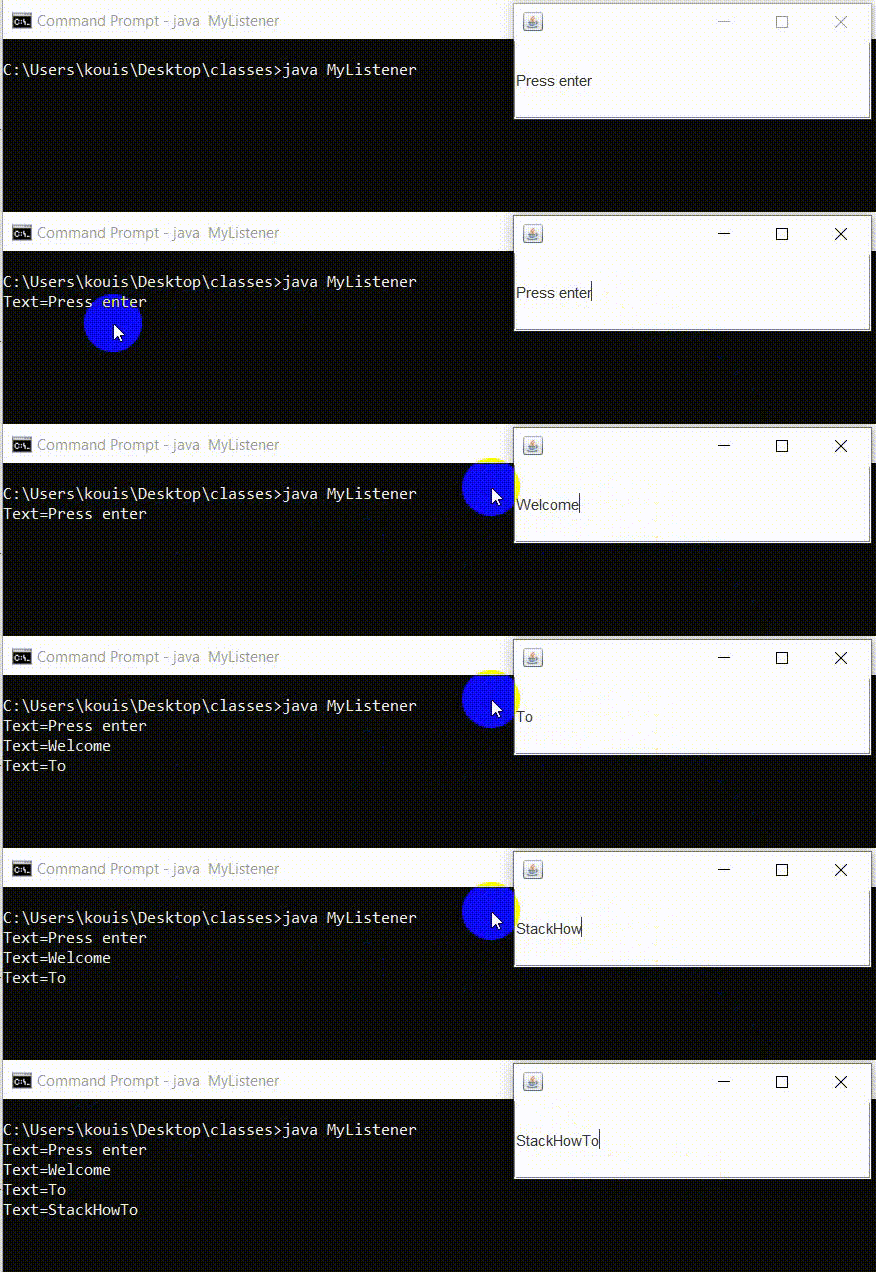
Java Program to Add a Listener for JTextField when it Changing:
import java.awt.event.*;
import javax.swing.*;

public class MyListener extends JFrame
{
  //create a JTextField
  JTextField textField = new JTextField("Press enter");

  //constructor
  public MyListener()
  {
    //add the listener on JTextField
    textField.addActionListener(new ActionListener() {
      //capture the event on JTextField
      public void actionPerformed(ActionEvent e) {
        //get and display the contents of JTextField in the console
        System.out.println("Text=" + textField.getText());
      }
    });

    //add JTextField to the frame
    getContentPane().add(textField);
    setDefaultCloseOperation(JFrame.EXIT_ON_CLOSE);
    setSize(300,100);
  }

  public static void main(String[] args) {
    new MyListener().setVisible(true);
  }
}
Output: