
How to Change Font Size in a JButton
In this tutorial, we are going to see how to change font size in a JButton, using the method setFont() of JButton class.
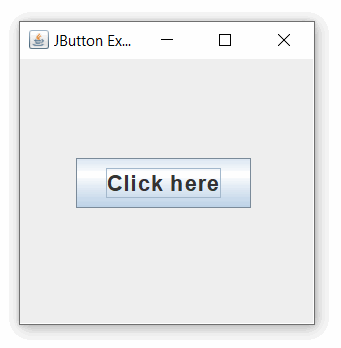
Example:
JButton button = new JButton("Click here");
button.setFont(new Font("Arial", Font.BOLD, 18));
- “Arial” is obviously the name of the font used.
- “Font.BOLD” means bold text (as opposed to PLAIN or ITALIC).
- “18” is the font size (using the same numbering system for font size as Microsoft Word).
Java Program to Change Font Size in a JButton:
import javax.swing.*;
import java.awt.*;

public class JButtonExample
{
  public static void main(String[] args)
  {
    //create a frame
    JFrame frame = new JFrame("JButton Example");
    //create button
    JButton btn = new JButton("Click here");
    //set button position
    btn.setBounds(45,80,140,40);
    //change font size of JButton
    btn.setFont(new Font("Arial", Font.BOLD, 18));
    //add button to frame
    frame.add(btn);
    frame.setSize(250,250);
    frame.setLayout(null);
    frame.setVisible(true);
  }
}
Output: