

How to Populate Jtable with a Vector
In this tutorial, we are going to see how to populate Jtable with a Vector. JTable is a flexible Swing component, is a subclass of JComponent class and it can be used to create a table with information displayed in multiple rows and columns. We can use a vector to fill a JTable.
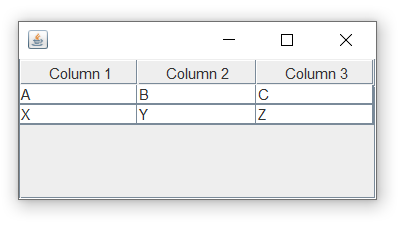
Java Program to Populate Jtable with a Vector:
import java.awt.BorderLayout;
import java.util.Vector;
import javax.swing.*;

public class Main
{
  public static void main(String args[])
  {
    //create a frame
    JFrame f = new JFrame();
    f.setDefaultCloseOperation(JFrame.EXIT_ON_CLOSE);

    //Row 1
    Vector<String> row1 = new Vector<String>();
    row1.addElement("A");
    row1.addElement("B");
    row1.addElement("C");

    //Row 2
    Vector<String> row2 = new Vector<String>();
    row2.addElement("X");
    row2.addElement("Y");
    row2.addElement("Z");

    //JTable data(Row 1 + Row 2)
    Vector<Vector> data = new Vector<Vector>();
    data.addElement(row1);
    data.addElement(row2);

    //JTable Header
    Vector<String> columns = new Vector<String>();
    columns.addElement("Column 1");
    columns.addElement("Column 2");
    columns.addElement("Column 3");
    JTable table = new JTable(data, columns);

    JScrollPane scroll = new JScrollPane(table);
    f.add(scroll, BorderLayout.CENTER);
    f.setSize(300, 150);
    f.setVisible(true);
  }
}
Output: